Introduction
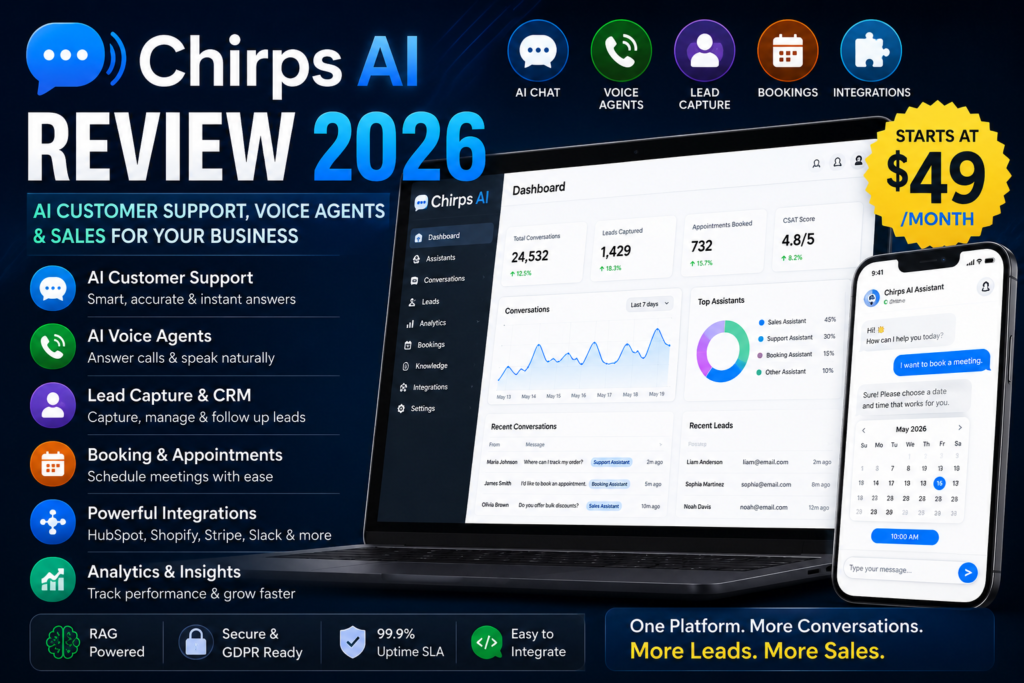
In this Chirps AI Review, I’ll take a practical look at how the platform handles AI customer support, voice agents, lead capture, bookings, integrations, and sales automation—and where its limitations may matter for real businesses.
Anyone running an online business runs into the same common problem — customers ask questions around the clock, but support teams can’t always be online. As a result, a lot of potential customers just leave while waiting for a reply. That’s exactly the gap tools like Chirps AI are built to fill. In this review, I’ve gone through Chirps’ official website and documentation and put together an honest breakdown, so you can make an informed decision before buying.
Customer support automation has changed quite a bit.
A few years ago, adding a “chatbot” to a website often meant building rigid decision trees: click this button, choose that option, and hope the customer asks exactly the question the bot was prepared for.
That is not what Chirps AI is trying to be.
Chirps positions itself as a business AI platform that can handle website chat, customer support, lead qualification, appointment booking, sales conversations and voice calls using agents trained on a company’s actual website and documents. Its documentation describes the system as RAG-powered, meaning it searches its indexed business knowledge before generating an answer rather than relying purely on a generic language model.
That combination immediately makes Chirps more interesting than a basic website chat widget.
But it also raises an important question:
Do most businesses actually need all of this — and does Chirps combine these tools well enough to justify another monthly subscription?
Table of Contents
Check Current Chirps AI Price & Offer →
How Does Chirps AI Work?
There are two ways to create an assistant.
The more interesting option is Chirps’ Agentic Builder.
Instead of configuring every setting manually, you describe what you need in ordinary language. Chirps says its builder can create the assistant persona, lead forms, interface colors and required tools from that description.
There is also a traditional manual setup process where you choose the business information, knowledge sources, language, personality, human support details and additional guidelines yourself.
Once the assistant is ready, Chirps gives you an embed script that can be added to a website.
Its documentation includes integration instructions for WordPress, WooCommerce, Shopify, Webflow, Wix, Squarespace, Framer and other platforms.
That is a workflow I like conceptually:
Train → customize → embed → monitor → improve.
It is much easier to understand than building complicated chatbot flows from scratch. For this Chirps AI Review, the most important question is not simply how many features the platform offers, but how well those features work together for customer support, lead generation, and sales.
In this Chirps AI Review, one of the strongest points is how the platform combines customer support with lead generation and sales automation.
Chirps AI Key Features
1. AI Support Trained on Your Business
The following features are the main reasons Chirps stands out in this Chirps AI Review.
The core of Chirps is its knowledge system.
Instead of manually programming every possible customer response, businesses can provide knowledge using website URLs, PDFs, documents and text.
The assistant then uses that information when responding to customers. Chirps describes the platform as RAG-powered, which means it retrieves relevant information from the connected knowledge base before generating a response.
That is important.
A customer asking:
“What is your refund policy?”
should receive an answer based on the company’s real policy rather than a generic AI-generated response.
I would still manually test important topics such as pricing, refunds, warranties and cancellation policies before allowing any AI agent to handle them publicly.
2. AI Voice Agents
Voice is one of the features that separates Chirps from many standard chatbot tools.
Customers can start a voice conversation through the website widget, while businesses can also purchase dedicated phone numbers for inbound AI calls.
Chirps says those calls use the same business knowledge as the website assistant, and transcripts can be stored in the Conversations section. Outbound callbacks can also be placed from the inbox.
This could be useful for:
- real-estate businesses
- consultants
- home-service companies
- appointment-based businesses
- sales departments
- businesses needing an AI receptionist
However, dedicated numbers and voice-minute usage can involve separate add-on costs, so voice-heavy businesses should calculate the total cost rather than looking only at the base subscription.
3. Lead Capture and CRM
Chirps can do more than answer questions.
Interactive forms can appear directly inside a conversation, allowing visitors to provide their details without leaving the chat.
Captured information can then be managed from Chirps’ lead-management system.
The dashboard includes areas for assistants, conversations, leads, analytics, communications and other business functions.
That can turn a simple conversation from:
“I have a question.”
into:
“Here are my details. Please contact me.”
For businesses where every lead has potential value, that is a meaningful capability.
4. Appointment Booking
Chirps also supports appointment booking.
A prospective customer can ask questions and then move into a booking flow within the same experience.
The platform supports calendar-related integrations, including Google Calendar and Microsoft Outlook/Teams, allowing the assistant to check availability and create events.
This could be especially useful for:
- consultants
- agencies
- coaches
- local service providers
- sales teams
The fewer steps between a customer’s question and a confirmed appointment, the better the experience can be.
5. Business Integrations
One of Chirps’ stronger areas is its connector system.
Its documentation currently lists preset connectors for services including:
- HubSpot
- Stripe
- Google Calendar
- Microsoft Outlook / Teams
- Notion
- Slack
- Airtable
- Shopify
- Zendesk
Depending on the integration, assistants may be able to retrieve or update information during a conversation—for example, looking up CRM contacts, checking calendar availability, retrieving Shopify order data or creating support tickets.
This moves Chirps closer to a business automation platform rather than a standalone chatbot.
6. Human Takeover
AI should not handle every customer issue.
Chirps allows human support staff to take over conversations when necessary. Conversations can be managed from the inbox, while AI and human involvement are also reflected in platform analytics.
I like this approach.
AI can handle repetitive questions.
Humans can handle exceptions, complaints, complex billing issues and important prospects.
A hybrid setup is generally more realistic than pretending AI should replace every customer interaction.
7. Forms, Booking Cards and Other Interactive Elements
Chirps refers to its interactive conversation components as Artifacts.
These can include things such as forms, bookings, cards and customer-satisfaction feedback.
Because they appear inside the conversation, visitors do not necessarily have to leave the chat to complete the next action.
For conversion-focused websites, that could make the chatbot far more useful than a basic question-and-answer tool.
8. Notifications and Analytics
Businesses can configure alerts when important events happen.
Chirps documents notification options involving email and channels such as WhatsApp, SMS, Telegram and Discord, although quotas and plan restrictions can apply.
The analytics dashboard also tracks metrics such as sessions, AI messages, customer satisfaction, AI-managed conversations and human involvement.
That matters because businesses should be able to answer:
Is this AI assistant actually helping us?
rather than simply installing it and assuming it works.
Chirps AI Pricing
At the time of checking, the official Chirps pricing page lists:
For this Chirps AI Review, I would judge the $49 Pro plan based on how much support, lead capture, booking, and automation your business will actually use.

Current JVZoo Offer
The dedicated JVZoo page currently advertises Chirps AI Pro starting at $49/month.
The starting Pro configuration includes:
- 5 AI assistants
- 5,000 monthly AI messages
- knowledge-base training
- custom branding
- voice functionality
- CRM lead capture
- calendar bookings
- 5 collaborator seats
- 10 workspace joins
- commercial-use rights
- priority support
The JVZoo page describes it as a recurring subscription rather than a lifetime purchase.
Check Current Chirps AI Price & Offer →
An Important Pricing Note
I found minor differences between some Chirps public pages.
For example, one documentation table references a different Free-plan message allowance than the public pricing page, and some plan descriptions vary depending on the page/version being displayed.
That does not necessarily mean anything is wrong — SaaS products change plans frequently — but it does mean.
From a pricing perspective, this Chirps AI Review focuses mainly on the Pro plan because it includes the broader set of features that businesses and agencies are most likely to consider.
check the checkout/current pricing page before purchasing based on a specific quota.
That is especially important for:
- message limits
- number of assistants
- phone numbers
- voice minutes
- notification quotas
- custom branding
- webhooks
Commercial License: What Does It Mean?
The JVZoo offer states that Pro includes a commercial license and says users can deploy Chirps in client projects or sell it as an agency service.
That could be attractive for marketing agencies.
However, I would distinguish between:
selling AI support setup/management as a service
and
reselling the actual Chirps SaaS platform as if you owned the software.
Those are not automatically the same thing.
If white-label SaaS resale is central to your business model, verify the exact reseller terms directly before selling accounts to clients.
Works everywhere.

What I Like About Chirps AI
The strongest thing about Chirps is that the features feel connected.
A visitor can:
ask a question → get an AI answer → submit details → become a lead → book a meeting → trigger an alert → speak to the AI → hand off to a human.
That is much more useful than having separate plugins for chat, forms, booking and lead notifications.
I also like that the product is not locked to one website builder.
WordPress businesses can use it.
Shopify businesses can use it.
Custom developers can use it.
Agencies can potentially manage multiple client deployments.
And because Chirps trains from actual website content rather than relying entirely on manually built chatbot trees, maintaining the knowledge base should theoretically require less repetitive work.
Check Current Chirps AI Price & Offer →
Where I Would Be Careful
Voice Can Increase the Real Cost
The $49 Pro subscription is not necessarily your complete cost if voice calling is important.
Dedicated phone numbers and minute bundles are separate add-ons according to the official documentation.
High call volume should therefore be priced before deployment.
Another feature worth highlighting in this Chirps AI Review is the ability to combine website chat with AI-powered voice conversations.
AI Still Needs Supervision
RAG reduces the likelihood of irrelevant answers, but it does not make AI infallible.
Before deploying Chirps publicly, I would personally test:
- refund questions
- product pricing
- shipping information
- appointment policies
- legal/compliance questions
- cancellation requests
A business should know exactly where the AI stops and a human begins.
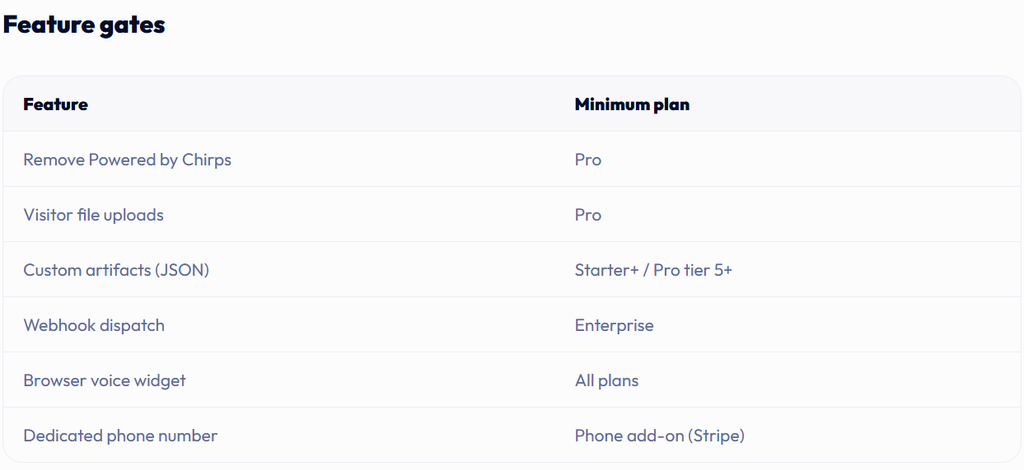
Some Advanced Features Are Plan-Gated
Features such as file uploads, complete branding removal, custom artifacts and webhook dispatch may require specific tiers.
Read the current plan details instead of assuming every feature shown in a demo comes with every subscription.
No Chirps AI Review would be complete without looking at the platform’s limitations as well as its advantages.
Public Pricing Information Has Minor Inconsistencies
As mentioned earlier, current documentation and pricing pages do not perfectly match on every quota.
I consider that something Chirps could make clearer.
To keep this Chirps AI Review balanced, it is also important to consider both the advantages and the limitations before subscribing.
Chirps AI Pros and Cons
Pros
- AI trained from website content and documents
- RAG-based support workflow
- Website chat and voice in one platform
- Dedicated AI phone numbers available
- Inbound and outbound calling capabilities
- Built-in lead capture
- Appointment booking
- Built-in CRM
- Human takeover
- Google Calendar integration
- HubSpot, Shopify, Stripe and other connectors
- Multi-channel lead alerts
- WordPress, Shopify, Wix, Webflow and other integrations
- Analytics and CSAT metrics
- Customizable widget
- Commercial-use potential for agencies
- Free option available for testing
Cons
- Pro plan is recurring
- Dedicated phone numbers/voice usage can cost extra
- Advanced functionality depends on plan level
- AI support still needs testing and supervision
- Some public pricing/quota information is inconsistent
- Enterprise webhook functionality may be overkill/too expensive for smaller users
- Businesses needing formal compliance guarantees should verify documentation independently
Who Is Chirps AI Best For?
I think Chirps makes the most sense for businesses where customer conversations have a direct connection to revenue.
Local Service Businesses
A visitor can ask questions, provide details and schedule an appointment even outside office hours.
SaaS Companies
The assistant can answer documentation and onboarding questions and escalate difficult issues to humans.
eCommerce Businesses
Chirps can potentially answer product questions and, through integrations such as Shopify, interact with order-related information.
Agencies
Managing multiple assistants and offering AI customer-support setup as a client service is one of the more interesting commercial uses.
Sales Teams
The combination of qualification, lead capture, bookings, and voice conversations makes sense for businesses where every inbound enquiry matters.
Who Probably Does Not Need Chirps?
If your website receives very little customer interaction, a $49/month Pro subscription may be unnecessary.
Likewise, if all you need is a basic FAQ chatbot with ten answers, Chirps may offer far more functionality than you need.
And businesses that already have deeply integrated enterprise support platforms should evaluate whether Chirps replaces anything meaningful or simply adds another tool to manage.
Chirps vs a Traditional Chatbot
| Traditional Chatbot | Chirps AI |
|---|---|
| Manual FAQ flows | Website/document knowledge |
| Mostly text chat | Chat + voice |
| Basic contact capture | Leads + CRM |
| External booking tool | In-chat booking |
| Limited automation | Notifications & integrations |
| No human escalation in some tools | Human takeover |
| Fixed responses | Natural-language AI responses |
Chirps’ documentation itself frames the distinction similarly: legacy chatbots rely more heavily on manually created decision trees, while Chirps uses crawled knowledge and RAG.
Is Chirps AI Worth It?
For the right business, I think the concept and feature combination are compelling.
At $49/month, Chirps AI Pro is not competing with a free WordPress chatbot plugin.
It is trying to replace or consolidate parts of:
- customer support
- website chat
- AI receptionist services
- lead capture
- appointment scheduling
- CRM intake
- customer notifications
- voice support
That changes how the price should be judged.
If it can save a business several hours of repetitive customer-support work every month or capture leads that otherwise disappear after business hours, the subscription becomes easier to justify.
If you only need a decorative chat bubble, it probably does not.
Final Verdict
My final conclusion from this Chirps AI Review is that Chirps offers a well-connected combination of AI chat, voice, lead capture, booking, and business automation tools.
Chirps is one of the more complete AI customer-engagement platforms I have looked at from a feature-architecture perspective.
What I like most is that it is not trying to automate support in isolation.
Chat connects to voice.
Voice connects to conversations.
Conversations connect to leads.
Leads connect to bookings, notifications and external business systems.
And humans can still step in when automation is not enough.
That is a sensible direction for AI customer service.
The main things I would verify before purchasing are your expected message volume, voice-call costs, exact plan limits and which advanced integrations you actually need.
I would also test the assistant extensively against real customer questions before giving it responsibility for sensitive support conversations.
So my conclusion is straightforward:
Chirps AI looks particularly promising for service businesses, SaaS companies, eCommerce stores and agencies that want one platform for AI chat, voice, lead capture and bookings. It is less compelling for sites that only need a simple FAQ bot.
Overall, this Chirps AI Review shows that the platform is best suited to businesses that can genuinely benefit from AI chat, voice support, lead capture, and booking automation.
Check Current Chirps AI Price & Offer →
.
Frequently Asked Questions
What is Chirps AI?
Chirps is an AI customer-support and sales platform that can be trained on website content and documents and deployed through website chat and voice interfaces.
Can Chirps AI answer phone calls?
Yes. Chirps supports browser voice conversations and optional dedicated phone numbers. Phone numbers and voice-minute bundles may involve additional charges.
Can Chirps capture leads?
Yes. It supports lead/contact forms inside conversations, and captured information can be stored in its built-in CRM.
Can customers book appointments through Chirps?
Yes. Chirps documents booking workflows with calendar integration, including Google Calendar and Outlook.
Does Chirps work with WordPress?
Yes. Official documentation includes instructions for WordPress and WooCommerce as well as Shopify, Webflow, Wix, Squarespace, and other platforms.
Does Chirps integrate with Shopify?
Yes. Shopify is supported both as an embed platform and as a documented business connector that can retrieve order and product-related information.
How much is Chirps AI?
The current JVZoo Pro offer is listed at $49/month for 5 assistants and 5,000 AI messages per month. Regular pricing also includes Free and Starter options.
Does Chirps guarantee more sales?
No. The JVZoo offer explicitly states that it does not guarantee income or business success.h and the starting Pro configuration at $49/month with 5 assistants and 5,000 monthly AI messages.
Is Chirps AI a lifetime deal?
No—not based on the current JVZoo offer. It is described as a $49/month recurring subscription.
Affiliate Disclosure: This review may contain affiliate links. If you purchase through one of these links, I may earn a commission at no additional cost to you. The purpose of this review is to help you understand what Chirps offers, where it looks useful, and what you should check before paying for it.