Introduction: The Design Tax That’s Eating Your Margins
Done-For-You Promo Emails 51 high-converting emails: 6 pre-launch + 10 niches x 3 launch emails + 6 FAQ, scarcity and closing + 9 sequence emails to successfully promote ClickDesigns X written by an 8-figure copywriter to COPY. PASTE. SEND… to your list.
Every business that sells something online eventually runs into the same wall. Your product looks great in real life. Your offer is solid. Your copy is sharp. But when you put it all together on a sales page, something’s missing: the visual. ClickDesigns X Review
Buyers can’t pick up your product. They can’t turn it over, check the label, or feel the weight of the box. All they get is what you show them. And they judge it in less than a second .
This is the Design Tax. You either pay it in time (learning complex design software), in money (hiring freelancers who charge per revision), or in missed sales (because your product looks cheap compared to competitors who invested in visuals) .
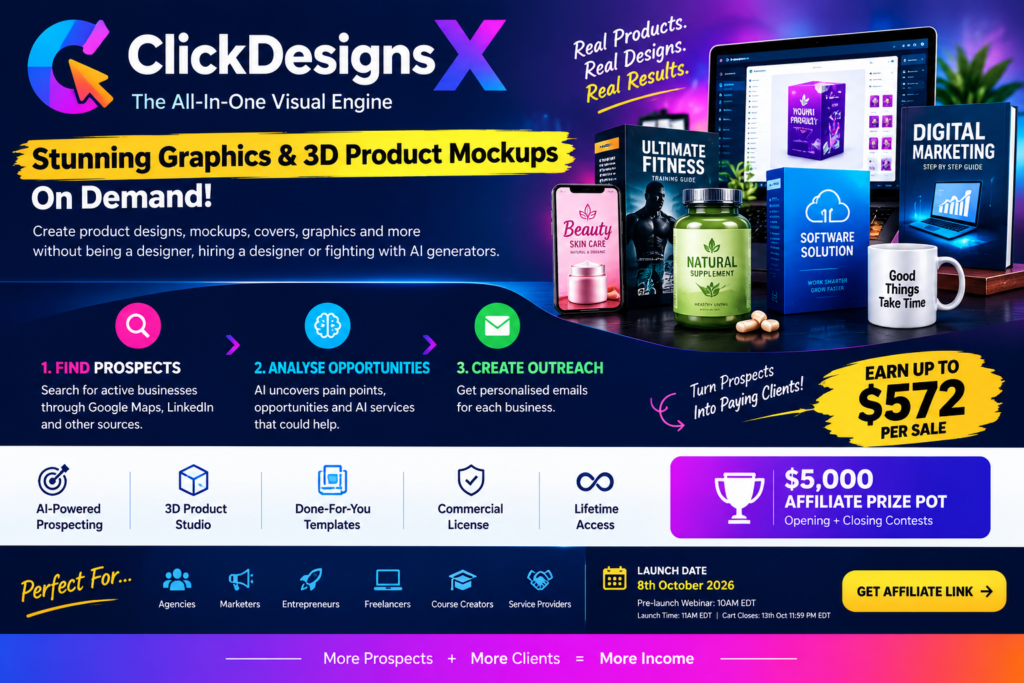
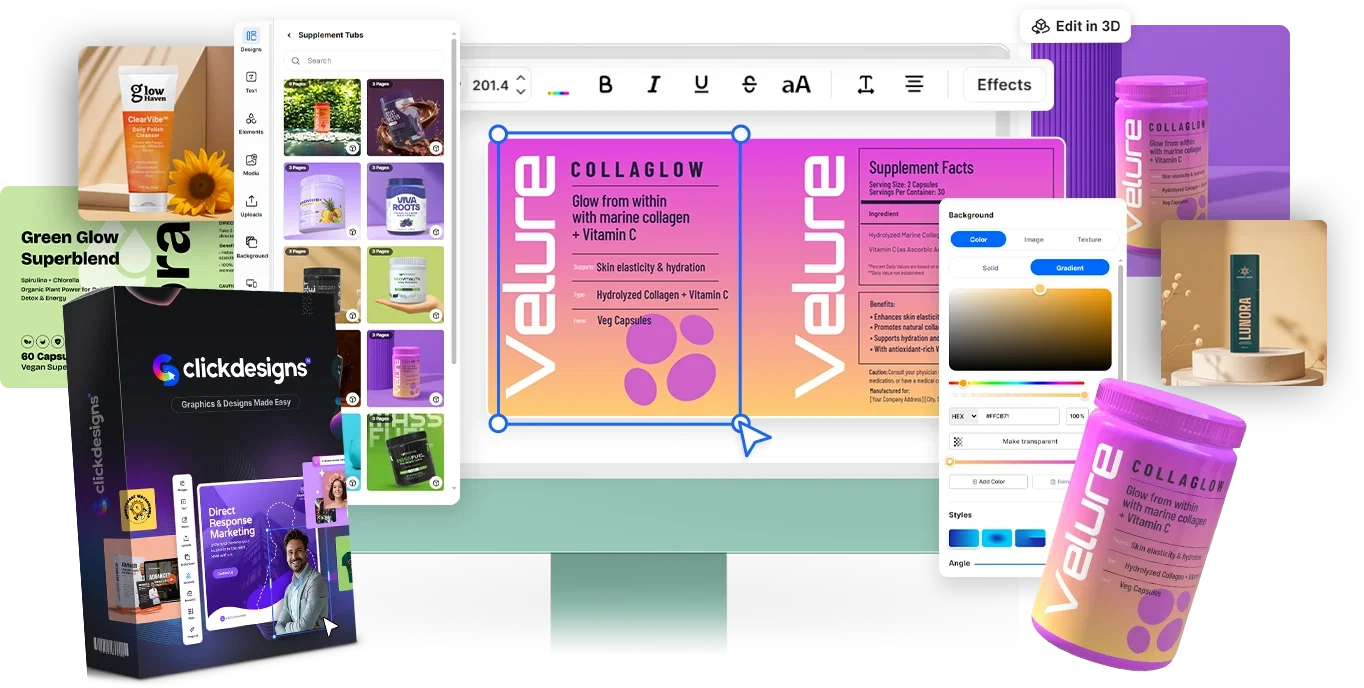
ClickDesigns X attacks this problem directly. It’s a browser-based design platform that combines template-based editing with a 3D Product Studio that wraps flat designs onto photorealistic 3D products—books, software boxes, bottles, tubs—in a single click .
ClickDesigns X is a browser-based graphic design platform that combines template-based editing with 3D product mockup generation. The core value proposition is the 3D Product Studio with 1-Click MagicWrap™, which wraps flat designs onto photorealistic 3D products—books, software boxes, bottles, and more—in a single click. ClickDesigns X Review
For ecommerce sellers, supplement brands, course creators, and digital product sellers, this solves a genuine pain point. Getting realistic product mockups traditionally requires either expensive 3D software, freelance designers, or hours of manual work in Photoshop. ClickDesigns X makes it fast and accessible.
Key Takeaways (TL;DR):
- 3D mockup engine is genuinely excellent for product-based sellers
- CMYK and print-ready label templates are a real professional advantage
- **$37 front-end is a limited version**—the full value requires $572+ in upgrades
- Marketing numbers don’t add up (user counts, testimonial counts, AI tool claims vary across sources)
- No live demo available at time of review
- Existing ClickDesigns users report slow loading speeds
👉Check ClickDesigns X Pricing and Launch Details
👉Check ClickDesigns X Bundle Pricing and Launch Details
Table of Contents
What Is ClickDesigns X?
ClickDesigns X is an all-in-one point-and-click design and 3D mockup platform created by Mo Latif. It is positioned as the next evolution of the original ClickDesigns, which launched in 2022 and generated $650,000 in its launch week. The original product has since accumulated 34,114+ users across 135 countries, created over 2 million designs, saved users an estimated $28+ million in design fees, and supported over $1 billion in user sales. ClickDesigns X Review
ClickDesigns X is a browser-based graphic design platform designed for marketers, ecommerce sellers, and content creators who need professional-looking product visuals without hiring a designer .
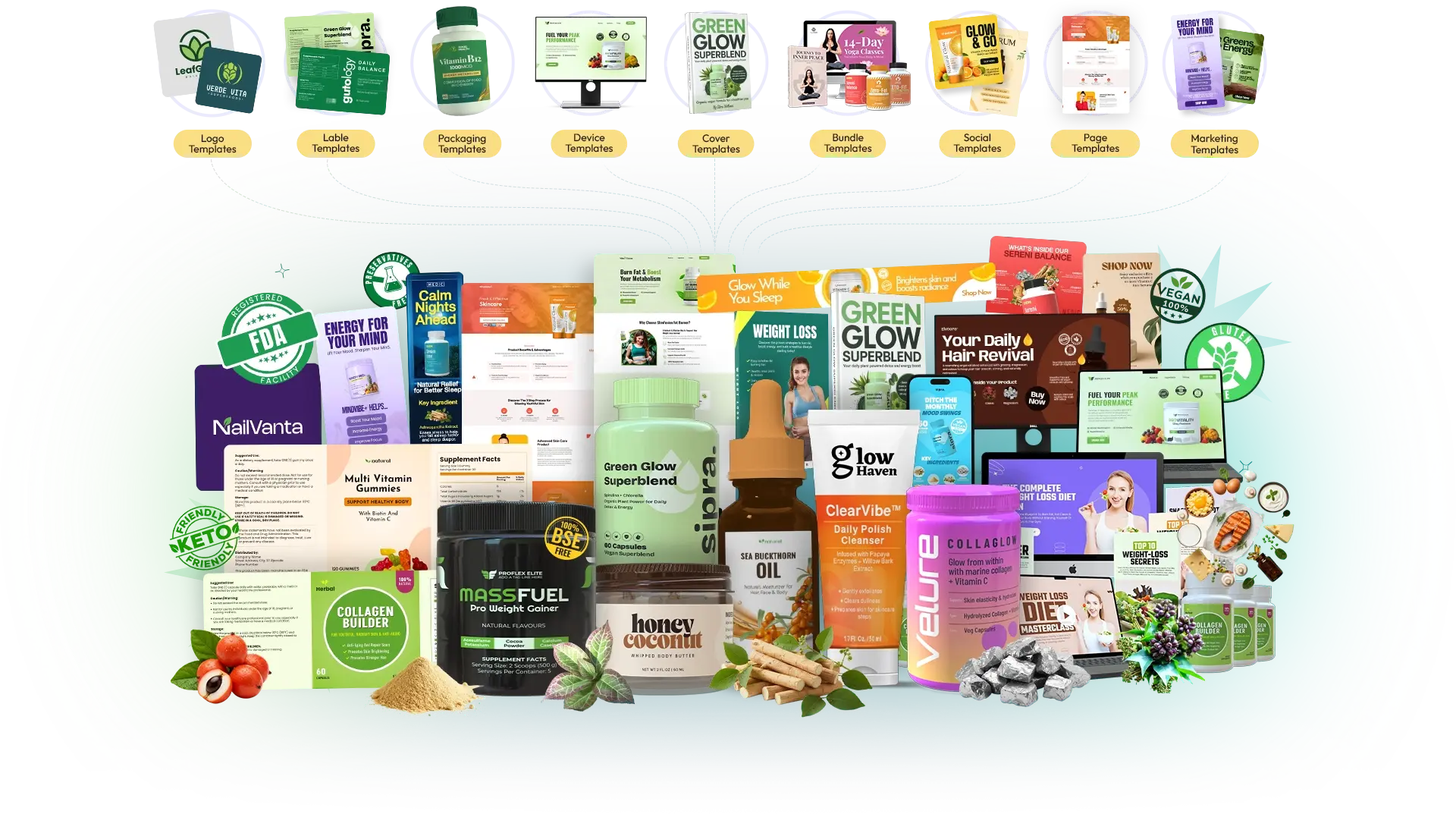
The core workflow is simple: pick a template or start from scratch, customize it with point-and-click controls, and export. The platform includes templates for logos, boxshots, book covers, product bundles, social media graphics, ad creatives, and more . ClickDesigns X Review
The Standout Feature: 3D Product Studio
What separates ClickDesigns X from generic design tools is the 3D Product Studio with 1-Click MagicWrap™. You upload a flat design—a book cover, a supplement label, a software box cover—and the software wraps it onto a photorealistic 3D product. The shape, depth, and perspective are handled automatically .
This is the feature that justifies the product’s existence. Creating realistic product mockups in Photoshop or Illustrator takes real skill and real time. ClickDesigns X makes it accessible .
What It Is NOT
To be clear about the limits:
- Not a full design suite like Canva—the template library is smaller and less diverse
- Not an AI image generator like Midjourney or DALL-E—the “AI” features are mostly prompt-based generators using third-party services
- Not a page builder—the “page designs” are layout templates, not hosted, published pages
Who Is Mo Latif?
ClickDesigns X is created by Mo Latif, a verified JVZoo seller with a track record that spans multiple product launches.
Track Record
According to the JV documentation, ClickDesigns 1.0 launched in 2022 and banked $650,000 during launch week . The platform has since accumulated:
- 34,000+ users across 135 countries (per one source) or 165 countries (per another)
- $1 billion+ in sales generated by users
- $28 million+ saved in design fees
- 4.8/5 rating from 6,898 reviews
What Reviewers Say
Independent reviewers note that Latif is a “digital marketing veteran with 2 decades of hands-on vendor and affiliate mastery” and has “100+ #1 Best Sellers” across JVZoo, DigiStore24, and ClickBank .
However, one detailed analysis points out that the endorsements on the sales page are “mostly from launch-industry figures who often show up in each other’s promotional materials. That isn’t fraud, but it isn’t an independent verification either” .
How ClickDesigns X Works
The workflow of ClickDesigns X is intentionally simple because the target user is not a designer. The entire platform is built around the idea that a non-designer should be able to create professional, conversion-ready visuals in minutes without opening Photoshop, writing a prompt, or briefing a freelancer. Here is how the process breaks down.
01. Choose a Template or Start From Scratch
ClickDesigns X provides done-for-you templates across every major use case: logos, product labels, book covers, software boxshots, social media posts, sales page graphics, ad banners, bundle shots, and print-ready materials. You can also start from a blank canvas if you have a specific vision. The templates are pre-sized and pre-structured, which eliminates the most common mistake non-designers make: starting with the wrong dimensions or layout.
Why this matters: Most design tools give you a blank canvas and expect you to know what good design looks like. ClickDesigns X gives you a finished starting point that you customise. This is the difference between design software and design assistance. For marketers, entrepreneurs, and agency owners who need speed more than creative freedom, templates are the correct starting point.
02. Customise With Point-and-Click Controls
Once you have selected a template, you customise it using point-and-click controls. Change colours to match your brand, swap out placeholder text for your product name, upload your logo, adjust fonts, and modify layout elements without touching code or learning layer-based editing. The interface is designed to feel like Canva but with the output quality and 3D capabilities of more advanced tools.
What you can customise: Product names, headlines, subheadings, call-to-action buttons, colour schemes, background images, logo placement, font pairings, spacing, and arrangement. The controls are visual and immediate, which means you see changes in real time rather than rendering and waiting.
03. Apply 1-Click MagicWrap to Turn Flat Into 3D
This is the signature feature. Once your 2D design is ready, you select a 3D product template from the library: books, software boxes, laptops, phones, tablets, supplement bottles, pill bottles, droppers, tubs, cosmetic containers, bundle shots, and more. You then apply MagicWrap in one click. The system automatically wraps your flat design onto the 3D template, handling perspective, curvature, lighting, shadows, and depth.
Why this is different from AI generators: AI image generators create an approximation of your product based on a text prompt. They often change the shape, lose the logo, corrupt the text, or add elements that do not exist. MagicWrap takes your exact design and maps it precisely onto a 3D template. Your logo stays your logo. Your product name stays your product name. Your colours stay your colours. The result is controllable, repeatable, and brand-accurate.
What you get: A photorealistic 3D mockup of your exact design, ready for use on sales pages, in ads, on social media, in emails, and in product listings. The 3D Product Studio then lets you spin, tilt, and zoom the mockup to find the angle that converts best.
04. Export Every Format From One Design
One of the most practical time-savers in ClickDesigns X is that a single design can generate multiple outputs. Your book cover becomes a 3D hardback, a 3D paperback, a stack of books, a Kindle mockup on a tablet, and a promotional banner. Your supplement label becomes a bottle, a tub, a dropper, and a bundle shot. Your software cover becomes a boxshot, a laptop mockup, a phone mockup, and a monitor display.
The practical impact: Instead of paying a designer for five separate mockups or spending hours recreating angles in Photoshop, you get every format you need from one source design. This is particularly valuable for launch weeks when you need sales page graphics, social media posts, email headers, ad creatives, and bonus images all at once.
The honest assessment of the workflow
This four-step process is genuinely what most product creators and marketers need. The question is not whether the workflow is logical — it is. The question is whether the template quality, customisation depth, and 3D wrapping accuracy are good enough to replace designers for standard use cases.
My read: for 80% of standard marketing graphics — ebook covers, software boxshots, supplement bottles, social posts, and sales page headers — ClickDesigns X will produce output that is significantly better than what a non-designer can create in Canva and significantly faster than what a freelancer can deliver. For the remaining 20% of complex, highly customised, or artistically unique work, you may still need a professional designer. But that 80% represents the majority of what most online businesses actually need on a weekly basis.

Key Features Breakdown
Point-and-Click Design Editor
The core of ClickDesigns X is a browser-based design editor that requires no download, no installation, and no design training. It is built to feel familiar to anyone who has used Canva, which is intentional — the vendor explicitly references Canva and Photoshop as the technology benchmarks. The editor supports layers, drag-and-drop positioning, text editing, colour changes, image uploads, and template customisation.
What separates it from generic design tools is the template library. Instead of starting from blank canvases, you start from finished designs that are already structured for specific marketing outcomes: sales pages, opt-in pages, webinar registrations, product launches, social media campaigns, and e-commerce listings. This dramatically reduces the decision fatigue that paralyses non-designers. ClickDesigns X Review
1-Click MagicWrap 3D Technology
This is the headline feature and the primary reason to consider ClickDesigns X over other design platforms. MagicWrap takes a flat 2D design and automatically maps it onto a 3D product template with correct perspective, curvature, lighting, and shadow. The technology handles the technical complexity of 3D wrapping — which normally requires specialised software like Adobe Dimension, Blender, or Photoshop 3D tools — and reduces it to a single click.
The 3D Product Studio then allows you to spin, tilt, and zoom the wrapped product to find the optimal angle for your specific use case. A book cover might look best at a 30-degree angle showing the spine. A supplement bottle might convert better straight-on with the label fully visible. A software box might need a dynamic angle for a hero image and a flat frontal view for a checkout page. You can generate all of these from one source design. ClickDesigns X Review
The supported 3D templates include: hardcover books, paperback books, software boxes, laptops, desktop monitors, tablets, smartphones, supplement bottles, pill bottles, dropper bottles, cosmetic tubs, bundle shots, and stack arrangements. This covers the vast majority of product types sold online.
Done-For-You Template Library
ClickDesigns X includes templates across ten major design categories. The front end provides access to the core template library, while OTO1 (Maximizer) unlocks 10,000+ premium templates. Here is what the template system covers:
Branding
Logos & Brand Identity
Pre-designed logo templates for different industries and brand personalities. Customisable with your brand name, colours, and tagline.
Products
Labels & Packaging
FDA-compliant pre-sized label templates with bleeds, margins, die-lines, and 300 DPI print-ready output for supplements, cosmetics, and physical products.
E-commerce
Store Designs
Amazon, Shopify, and Etsy optimised visuals including product images, store banners, and listing graphics designed to increase click-through and conversion rates.
Social
Social Media Content
Scroll-stopping posts sized and dimensioned for Instagram, Facebook, Pinterest, LinkedIn, X, and TikTok. OTO2 adds 2,000+ social templates in 44 sizes with scheduling.
Marketing
Sales & Marketing Materials
High-converting promotional banners, ad creatives, sales page graphics, webinar slides, and email headers designed for direct response marketing.
Print-Ready Materials
Business cards, flyers, brochures, letterheads, invoices, and offline promotional materials with proper print specifications.
Funnels
Page Designs
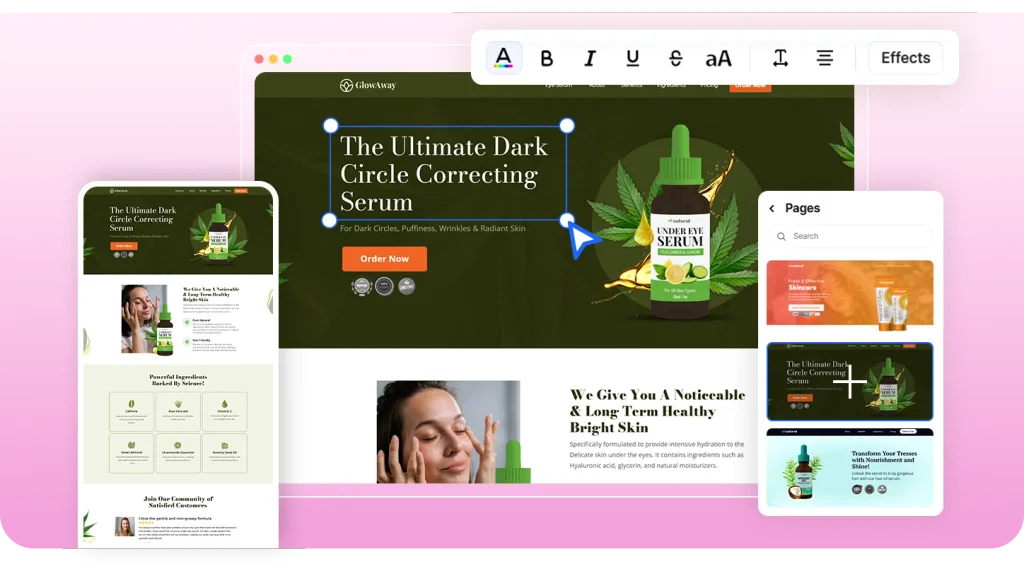
Landing pages, sales funnels, and promotional page designs that integrate with major page builders and platforms.
Products
Bundles & Covers
Mockup bundles, lead magnet covers, and product stack images that show buyers everything they are getting in one visual.
Commercial License Included
The front end includes a Commercial License, which means you can create designs and mockups for clients and charge for them. This is a critical feature for agency owners, freelancers, and service providers. A single logo design can command $300 to $1,000. A complete brand package with mockups can run $2,000 or more. At $37 one-time, the Commercial License alone justifies the purchase for anyone who plans to sell design services. ClickDesigns X Review
Platform Integrations
ClickDesigns X integrates with a wide range of platforms that online businesses already use. The vendor claims it is the first app to integrate with GoHighLevel, which is significant given GoHighLevel’s dominance in the agency and local business marketing space. Other integrations include Groove, Convertri, ProductDyno, MintBird, WordPress, WooCommerce, Shopify, Kajabi, ClickFunnels, HighLevel, and numerous email marketing and CRM platforms.
This integration ecosystem matters because it means the designs you create in ClickDesigns X can flow directly into the platforms where you actually use them, rather than being trapped in a standalone tool that requires manual exporting and re-uploading. ClickDesigns X Review
⚠ What the front end does not include
The $37 front end gives you the core design editor, template library, 3D Product Studio with MagicWrap, and Commercial License. It does not include the 10,000+ premium templates (OTO1), the social media automation and scheduling system (OTO2), the advanced animated and interactive 3D mockups (OTO3), the agency and team features (OTO4), or the AI-powered auto-design generation (OTO5). If you need unlimited designs, social automation, or agency functionality, you will need the upgrades.
Comparison
ClickDesigns X vs AI Image Generators: Why Control Beats Prompt Roulette
The most common objection to buying a design tool in 2026 is: “Can’t AI just do this now?” It is a fair question, and the vendor’s materials address it directly. The honest answer is that AI image generators and ClickDesigns X solve different problems with different trade-offs. Understanding the difference is essential to deciding whether this tool is worth your money. ClickDesigns X Review
| Factor | AI Image Generators | ClickDesigns X |
|---|---|---|
| Input method | Text prompt describing what you want | Your actual design file or template customisation |
| Output control | Low — each generation is different | High — your exact design is preserved |
| Logo accuracy | Often lost, distorted, or changed | Your uploaded logo stays exactly as uploaded |
| Text accuracy | Frequently garbled, misspelled, or nonsensical | Your text renders exactly as you typed it |
| Product consistency | Shape, size, and features vary between generations | Same design mapped to consistent 3D templates |
| Speed per asset | 1–3 minutes per generation, plus prompt refinement | One click to wrap; 10–30 minutes for a full campaign |
| Learning curve | Prompt engineering skill required | Point-and-click; no training needed |
| Best use case | Concept art, inspiration, backgrounds, unique imagery | Product mockups, marketing graphics, brand assets |
| Repeatability | Difficult to recreate the same result | Fully repeatable; save and reuse templates |
| Brand safety | Risk of unexpected elements, artifacts, or distortions | Predictable output based on your approved design |
The prompt roulette problem
Anyone who has used Midjourney, DALL-E, Stable Diffusion, or similar tools for product mockups knows the cycle. You write a prompt. The product looks good but the logo is missing. You adjust the prompt. The logo appears but the product shape changed. You generate again. The text on the label is garbled. You generate again. The bottle now has seven fingers holding it. This is what the vendor calls “prompt roulette,” and it is the single biggest reason AI image generators fail for commercial product mockups.
The problem is fundamental to how generative AI works. These models do not understand your brand, your product, or your design. They predict pixels based on patterns in training data. When you ask for “a supplement bottle with my label,” the AI has no concept of “your label.” It generates a plausible-looking supplement bottle with plausible-looking text and graphics. The result may be visually impressive, but it is not your product. For marketing purposes, that distinction is everything. ClickDesigns X Review
Why MagicWrap is different
MagicWrap does not generate a product that looks like yours. It takes your actual design — the exact pixels you created or uploaded — and maps them onto a 3D template with mathematically correct perspective, curvature, and lighting. Your logo is your logo. Your product name is your product name. Your colour scheme is your colour scheme. The result is not an approximation. It is your design, presented in three dimensions. ClickDesigns X Review
This matters for conversion because buyers make trust decisions based on visual consistency. If your sales page shows a product mockup that does not quite match your actual product, that subtle disconnect creates doubt. If your ad creative shows a bottle with different labeling than your landing page, you lose credibility. ClickDesigns X eliminates this problem by ensuring that every mockup, every angle, and every format comes from the same source design.
When AI generators still win
I want to be balanced here because AI image generators are genuinely useful for certain tasks. If you need a unique hero image for a blog post, a conceptual illustration for a course, a background scene for a video, or inspiration for a brand direction, AI generators are excellent tools. They excel at creativity and novelty. ClickDesigns X does not replace them for those use cases. What ClickDesigns X replaces is the frustrating attempt to use AI generators for precise, brand-accurate, repeatable product mockups — which is the one thing they consistently fail at.
The practical verdict
If you need unique artistic images, use AI generators. If you need accurate product mockups, marketing graphics, and brand-consistent visuals, use ClickDesigns X. They are complementary tools, not competitors. The smartest users will use both: AI generators for creative exploration, ClickDesigns X for commercial output.06 · Pricing
ClickDesigns X Pricing & Funnel Structure
Mo Latif has structured the ClickDesigns X funnel to maximise both customer value and affiliate earnings. The front end is aggressively priced at $37 one-time during launch, with a clear upgrade path that adds capabilities for power users, agencies, and social media marketers. The Bundle at $397 represents the complete stack. Here is the full breakdown from the official JV documentation. ClickDesigns X Review
| Step | Offer | Price | What it adds |
|---|---|---|---|
| Front End | ClickDesigns X — Point-and-click design editor, templates, 3D Product Studio, 1-click MagicWrap, Commercial License | $37 | Core design and 3D mockup engine; browser-based editor; template library; 3D wrapping technology; commercial use rights |
| OTO 1 | ClickDesigns X Maximizer | $97 | Unlimited projects, designs and downloads; 10,000+ premium templates; 2D & 3D books, newsletters, supplement and cosmetic ranges; book publishing sizes; print-ready output; FDA supplier labels; custom template designer; 1-click cloner |
| OTO 2 | ClickSocials X | $77 | All-in-one social media automation: plan, design, schedule and publish from inside ClickDesigns X; 2,000+ social templates in 44 sizes; content calendar; 1-click network connect; AI Social Writer; ClickThumbnails mega bonus |
| OTO 3 | 3D Design Studio X | $97 | Animated & interactive 3D mockups; 360° spin mockups buyers can rotate and zoom; cinematic product videos; auto-loop GIFs; LIVE 3D links and embeds for any page; Smart AI 3D Studio; custom product bundles |
| OTO 4 | ClickDesigns X Agency | $197 | Full design agency from one account: team access, brand kits, client work and project management, watermarking, unlimited hosting, Smart AI Studio, Chrome and WordPress extensions, Work From Anywhere system |
| OTO 5 | ClickDesigns AI Turbo | $67 | AI design army: type a keyword or paste a URL and AI Turbo writes, designs and auto-sizes ready-to-launch ads, banners and social posts for every platform in seconds |
| Bundle | ClickDesigns X Bundle — FE plus all 5 OTOs | $397 ($100 coupon during launch) | Complete design, 3D, social, agency, and AI automation stack |
👉Check ClickDesigns X Pricing and Launch Details
👉Check ClickDesigns X Bundle Pricing and Launch Details
What Real Users Are Saying
Trustpilot Rating: 4.5/5
The existing ClickDesigns platform has a 4.5/5 rating on Trustpilot, with mixed reviews.
Positive reviews praise:
- Support team: “Second to none, in the way that they respond promptly, courteously, empathetically, accurately and comprehensively”
- Time savings: “Makes a non-graphic designer look like a designer”
Critical reviews note:
- Load speed: “The load speed really lets it down… uploads, saving, moving between design levels, all of these are crazy slow”
- Bugs: “A few bugs as well with items disappearing and saving”
Independent Review Findings
One detailed analysis notes that the ClickDesigns X marketing materials have inconsistent numbers:
- User counts: 20,000 / 30,000 / 34,000 depending on the source
- Countries: 135 / 165
- Testimonial count: 3,146 / 6,898 on the same page
No demo available: As of one review, the demo slot on the vendor’s page says “video coming soon” .
Who Should Buy ClickDesigns X?
Strong fit (buy with confidence)
Product creators
Digital product sellers
You sell ebooks, courses, software, templates, or digital tools. Your sales page lives or dies by how professional your product looks. ClickDesigns X turns flat covers into 3D boxshots, books, and device mockups that make your offer look premium before a single word is read.
E-commerce
Physical product sellers
You sell supplements, cosmetics, books, or physical goods on Amazon, Shopify, Etsy, or your own store. Professional product mockups, labels, and packaging visuals directly impact click-through rates and conversion. The FDA-compliant label templates and 3D bottle mockups are built for this.
Agency owners
Design and marketing agencies
You create visuals for clients. The Commercial License means you can charge $300–$1,000+ for logo packages, mockup bundles, and sales page graphics while producing them in minutes instead of hours. OTO4 adds team access and client management.
Course creators
Online educators and coaches
Your course might be exceptional, but if the thumbnail, sales page hero image, and bonus graphics look amateur, enrollment suffers. ClickDesigns X gives your course the visual credibility it deserves without hiring a designer for every launch.
Affiliate marketers
Bonus page and review site owners
You build bonus pages, review sites, and bridge pages that need professional graphics fast. The template library and 3D mockups let you create bonus bundles, product stacks, and promotional banners without waiting for a designer or wrestling with complex software.
Authors
Self-published writers and publishers
Your book cover is your entire storefront on Amazon and other platforms. A flat 2D cover is standard. A 3D book mockup with spine, back cover, and stacking variations makes your book look like a traditionally published title. This matters for perceived value and pricing power. ClickDesigns X Review
Software vendors
SaaS and app creators
Your app has no physical box, which makes it harder to communicate value visually. ClickDesigns X creates software boxshots, laptop mockups, phone mockups, and monitor displays that give your digital product a tangible, premium presence.
Social media managers
Content creators and SMM professionals
You need a constant stream of visually consistent, platform-optimised graphics. OTO2 adds 2,000+ social templates in 44 sizes with scheduling and publishing. Even the front end templates cover the major social platforms.
Poor fit (be honest with yourself)
Skip it
You are already a professional designer
If you are fluent in Photoshop, Illustrator, Blender, and Dimension, and you enjoy the creative process, ClickDesigns X will feel limiting. It is built for speed and consistency, not artistic exploration. You already have better tools.
Skip it
You need highly custom, unique artwork
Template-based design has boundaries. If your brand requires completely original illustrations, complex photo compositing, or bespoke artistic direction, you will eventually hit the limits of any template system. Hire a designer for that work.
Skip it
You already have a design team and workflow
If you have a reliable designer or design team that delivers fast, on-brand work at a reasonable price, you may not need another tool. The value of ClickDesigns X is highest when you do not have that resource.
Skip it
You expect it to replace all design needs forever
ClickDesigns X handles 80% of standard marketing design needs exceptionally well. For the remaining 20% of complex, unique, or highly technical design work, you may still need specialised software or professionals. Set expectations accordingly. ClickDesigns X Review
Skip it
You will not actually use it
A design tool only saves money if you use it. If you buy it, create one graphic, and never open it again, you have not saved $2,000 in designer fees. You have spent $37 on a digital product you did not need. Be honest about whether you have products to promote, clients to serve, or launches to run.
Skip it
You want a done-for-you business
The Commercial License lets you sell design services, but you still need to find clients, deliver work, and build a business. This is a tool, not a business-in-a-box. If you want passive income with no effort, this is not it.
Pros and Cons
Pros ✅
Cons ❌
Is ClickDesigns X a Scam?
No. ClickDesigns X is a legitimate product from a verified JVZoo seller with a 4-year track record. The 3D mockup engine works. The print-ready labels are real. The commercial license is included.
The Case for Legitimacy
- Verified vendor: Mo Latif is a verified JVZoo seller
- Real product: ClickDesigns 1.0 has been operating since 2022
- 30-day guarantee: Standard JVZoo protection
- Real use cases: 3D mockups, print labels, box shots are genuine needs
The Case for Caution
- Marketing inflation: Numbers don’t match across sources
- Limited front-end: The $37 purchase is restricted
- No demo: Can’t test before buying
- Slow loading: Existing user complaints
- AI overhype: The “35+ AI tools” claim is inflated
Our assessment: ClickDesigns X is a real product with a genuinely useful core feature (the 3D mockup engine). But the marketing oversells the AI capabilities and obscures the fact that the $37 front-end is a limited version. If you need 3D product mockups and print-ready labels, it’s worth considering. If you’re expecting a full Canva replacement with best-in-class AI, you’ll be disappointed.
Final Verdict ClickDesigns X Review 2026: The 3D Mockup Engine That Turns Flat Designs Into Photorealistic Products
The Bottom Line
ClickDesigns X solves a real problem for a specific audience: product sellers who need realistic 3D mockups without hiring a designer. The 3D Product Studio with MagicWrap™ is the standout feature, and the print-ready label templates are a genuine professional advantage. ClickDesigns X Review
However, the marketing inflates the AI capabilities, the numbers don’t add up, and the $37 front-end is a limited version of the product.
| Criteria | Score | Reasoning |
|---|---|---|
| Innovation | ⭐⭐⭐⭐⭐ | 3D mockup engine is genuinely useful |
| Value for Money | ⭐⭐⭐⭐ | $37 entry is low, but full value requires $297+ |
| Ease of Use | ⭐⭐⭐⭐⭐ | Template-based, browser-based, low learning curve |
| Creator Reputation | ⭐⭐⭐⭐⭐ | Established vendor, but marketing inflated |
| Risk Level | ⭐⭐⭐⭐ | No demo, slow loading reports, funnel complexity |
| Potential Value | ⭐⭐⭐⭐⭐ | Excellent for product mockups and print labels |
Overall Rating: ⭐⭐⭐⭐ (4.5/5)
👉Check ClickDesigns X Pricing and Launch Details
👉Check ClickDesigns X Bundle Pricing and Launch Details
Our Recommendation
If you sell physical products (supplements, skincare, ecommerce) and need realistic 3D mockups and print-ready labels, ClickDesigns X is worth considering. The 3D Product Studio is the reason to buy. Start with the $37 front-end to test the core editor and mockup engine, then upgrade only if you need more templates.
If you’re a course creator or digital product seller who needs box shots, covers, and bundle images, the front-end may be sufficient. The 3D mockups make digital products look tangible.
If you’re looking for a Canva replacement or expecting Midjourney-quality AI, look elsewhere. This is a specialist tool for product visualization, not a general-purpose design platform.
The key insight: ClickDesigns X’s 3D mockup engine is genuinely excellent. But the marketing oversells everything else. Buy it for the mockups and print labels. Ignore the AI hype.
Frequently Asked Questions
Q: What is ClickDesigns X?
A: A browser-based graphic design platform with a 3D Product Studio that wraps flat designs onto photorealistic 3D products in one click.
Q: Who created ClickDesigns X?
A: Mo Latif, a verified JVZoo seller and creator of ClickDesigns 1.0.
Q: How much does ClickDesigns X cost?
A: Front-end is $37 one-time. Upsells range from $67 to $197. The Bundle is $397 (or $297 with coupon).
Q: When does ClickDesigns X launch?
A: October 13, 2026 at 11:00 AM EST. Cart closes October 19, 2026.
Q: Is ClickDesigns X a scam?
A: No. It’s a legitimate product from a verified vendor with a 30-day guarantee. The 3D mockup engine works. However, marketing numbers are inflated.
Q: Do I need design skills?
A: No. The platform is template-based with point-and-click controls.
Q: Is the $37 front-end enough?
A: It includes the core editor and 3D mockup engine, but the template library is limited and AI tools require upgrades.
Q: Does it work with Canva?
A: ClickDesigns X is a separate platform. It doesn’t integrate with Canva, but you can import flat designs from Canva to create 3D mockups.
Q: Is there a money-back guarantee?
A: Yes, a 30-day money-back guarantee.
Disclaimer
This review contains affiliate links. We may receive a commission if you purchase through these links. All opinions are our own and based on available information from independent reviews and the official sales materials as of October 2026. ClickDesigns X does not guarantee income, results, or earnings. Always do your own research before making any purchase decision.